Terminal · Git · AI tools · Prompts
The Vibe Coder Cheat Sheet
Build with AI without pretending the terminal, Git, deployment, and prompts are obvious. One sharp map for the parts beginners actually touch.
- Commands
- 40+
- Tools
- 20+
- Skills
- 19
- MCPs
- 9
- Prompts
- 9
Bash you'll actually use
The terminal is a text-based remote control for your computer. You don't need to learn all of it — just these commands will cover 90% of what you do.
Moving around files
pwdShow which folder you're in right now.
lsList files and folders in the current directory.
ls -laList everything, including hidden files (like .env).
cd my-folderEnter a folder called my-folder.
cd ..Go up one folder.
cd ~Go to your home folder.
mkdir new-folderCreate a new folder.
touch file.txtCreate a new empty file.
cat file.txtPrint the contents of a file.
rm file.txtDelete a file. Careful — no undo.
rm -rf folderDelete a folder and everything inside it. Extremely dangerous.
Never run this on a path you don't fully understand.
cp a.txt b.txtCopy a file (a.txt → b.txt).
mv old.txt new.txtRename or move a file.
clearWipe the terminal screen. (Cmd/Ctrl+L also works.)
open .Open the current folder in Finder (Mac). Use explorer . on Windows.
Installing packages
pnpm installInstall all dependencies listed in package.json.
pnpm add react-iconsAdd a new package to your project.
pnpm add -D eslintAdd a dev-only dependency (tools, not shipped).
pnpm remove react-iconsRemove a package.
pnpm devStart the local dev server. Usually on http://localhost:3000.
pnpm buildBuild your app for production.
pnpm startRun the production build locally.
npx shadcn@latest add buttonInstall a shadcn/ui component into your project.
Environment & misc
echo $PATHShow where your shell looks for commands.
which nodeCheck where a command lives (e.g. node, pnpm, python).
node -vCheck your Node.js version.
pnpm -vCheck your pnpm version.
code .Open the current folder in VS Code / Cursor.
kill -9 $(lsof -ti:3000)Free up port 3000 when something's stuck.
Git without the tears
Git is a time machine for your code. Every commit is a save point. When everything breaks, you can always go back to a working version.
The daily loop
git statusSee what files you've changed.
git add .Stage all your changes for the next commit.
git commit -m "add login page"Save a snapshot with a message.
git pushSend your commits to GitHub.
git pullDownload the latest changes from GitHub.
git clone https://github.com/user/repo.gitDownload a project from GitHub.
git checkout -b new-featureCreate and switch to a new branch.
git log --oneline -10See the last 10 commits in a compact list.
git restore file.tsxUndo unsaved changes to a file.
Undo staged file with: git restore --staged file.tsx
The rhythm
- 1. Make a small, working change.
- 2.
git add .to stage it. - 3.
git commit -m "what I did" - 4.
git pushto back it up on GitHub. - 5. Repeat every 15–30 minutes. Future-you will thank you.
Golden rule: commit before any risky change. If it all goes wrong, you're one command away from safety.
Your AI toolbox
Different tools are good at different things. Use a chat for thinking, a builder for shipping, and an SDK when you need to put AI inside your own app.
Build apps
v0
Full-stackBuild full-stack apps by chatting. Deploys to Vercel in one click.
v0.appCursor
EditorAI-native code editor. Like VS Code, but with a coding agent built in.
cursor.comClaude Code
CLI agentAnthropic's terminal-based coding agent. Runs in your repo.
claude.comBolt
PrototypePrompt to app in the browser. Good for quick prototypes.
bolt.newLovable
PrototypeAnother prompt-to-app builder with a visual editor.
lovable.devReplit
Browser IDEBuild, run, and host apps entirely in your browser.
replit.com
Think & write
ChatGPT
General-purpose AI chat. Great for brainstorming and explanations.
chat.openai.comClaude
Strong at long-context work, writing, and reading code.
claude.aiGemini
Google's chat model. Ties into Google Workspace.
gemini.google.comGrok
xAI's assistant. Real-time info via X.
grok.comPerplexity
AI search engine. Gives sources with every answer.
perplexity.aiOpenRouter
AI model router. Use any of the frontier models.
openrouter.ai
Put AI inside your app
Vercel AI SDK
RecommendedThe easiest way to add AI to a Next.js app. Streaming, tools, agents.
ai-sdk.devSparkleTree
AnnouncedThe easiest way to add AI agents to your react application. Comming Soon.
ai-sdk.devAI Gateway
One API key, every model. OpenAI, Anthropic, Google, Groq, xAI.
vercel.comOpenAI SDK
Official SDK for GPT models, images, voice, and agents.
platform.openai.comAnthropic SDK
Official SDK for Claude models.
docs.claude.comLangChain
Framework for chains, agents, and RAG. Can be overkill for simple cases.
js.langchain.com
Visual shortcut sheets
Two quick-reference sheets for the editor loop: Codex Desktop for agent work, Zed for fast local navigation.
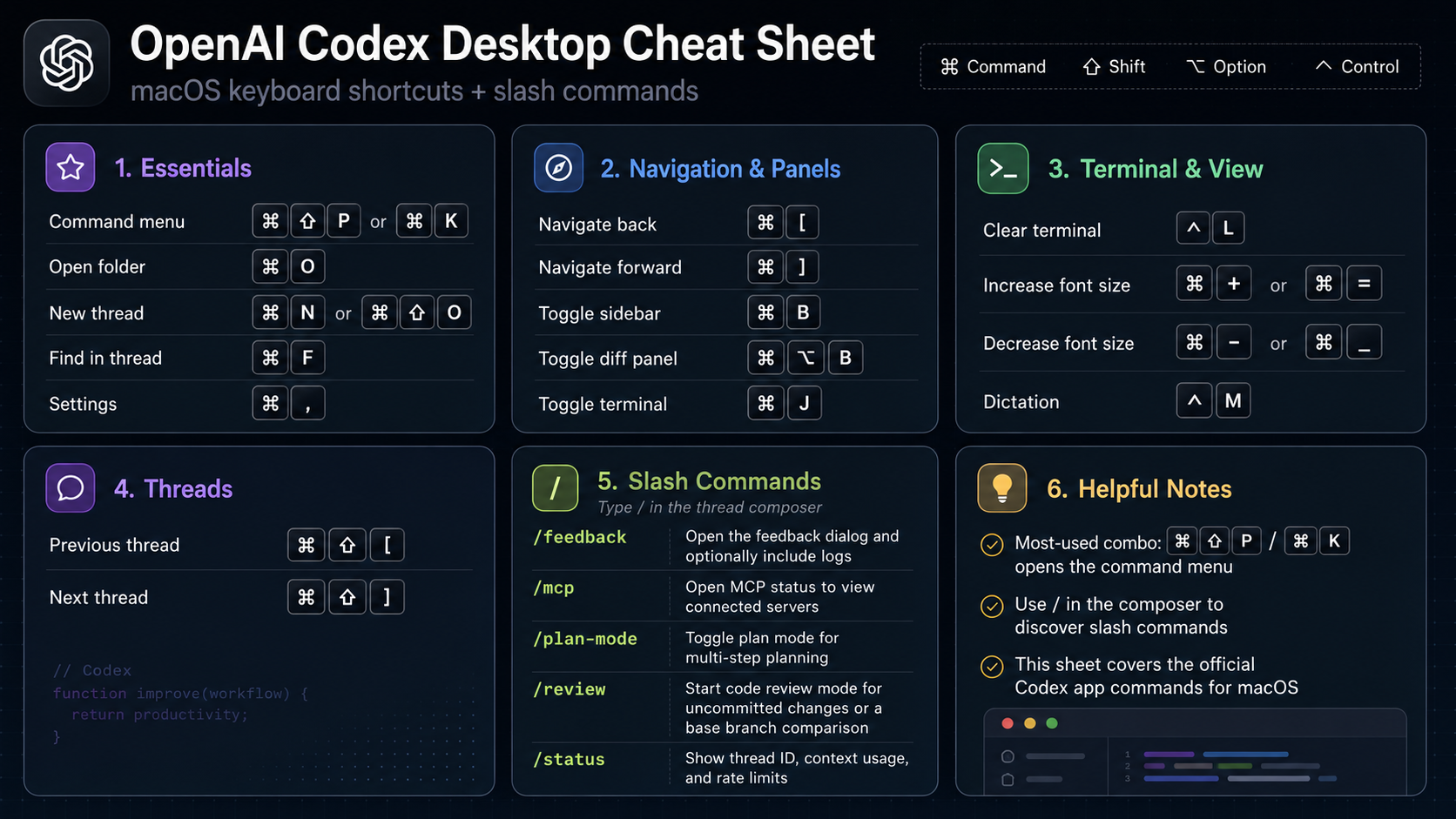
OpenAI Codex Desktop
macOS shortcuts and slash commands for the Codex desktop app.
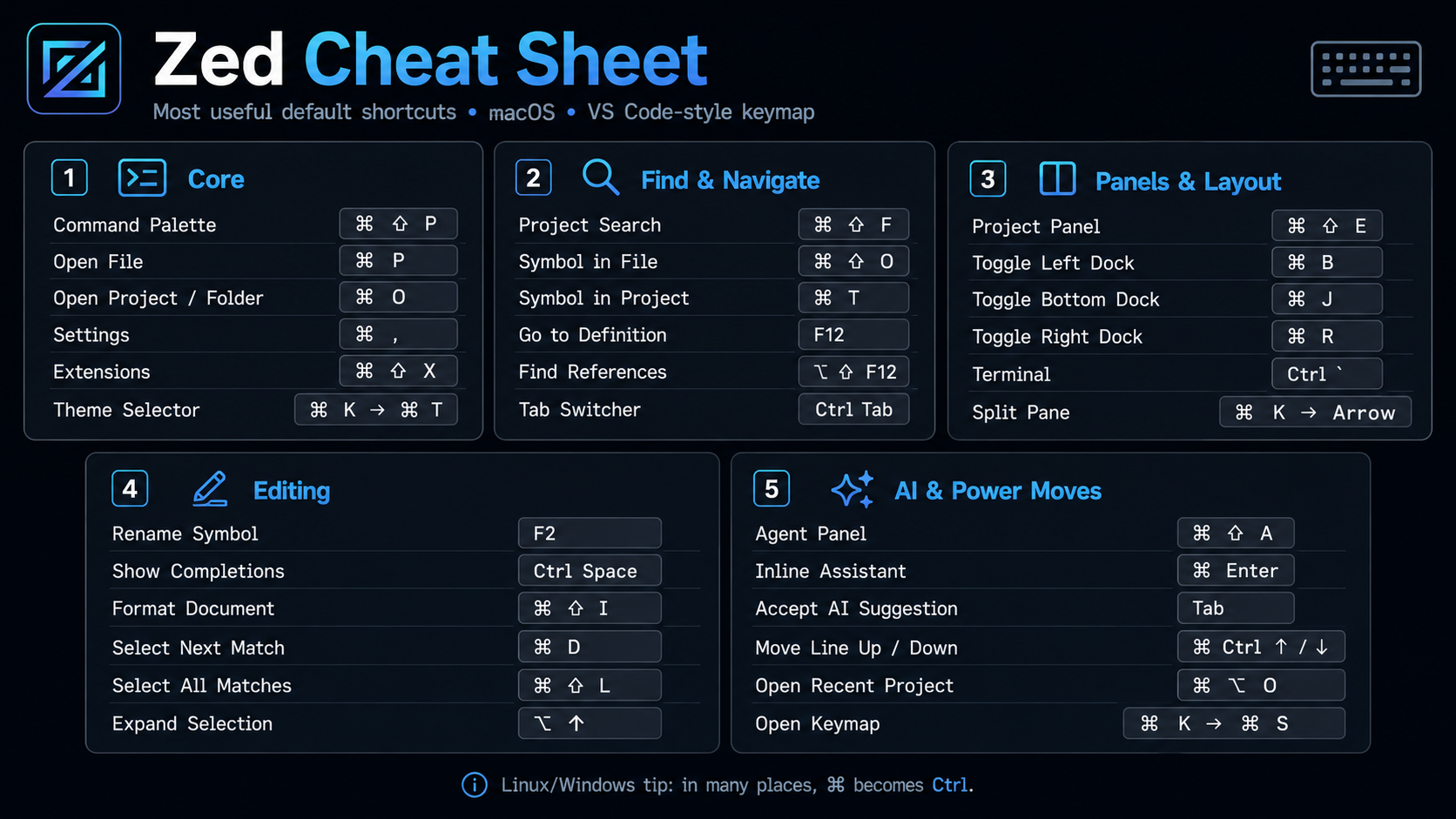
Zed
Default macOS shortcuts for the VS Code-style Zed keymap.
Skills — expertise on tap
Skills are pre-packaged playbooks that AI tools load on demand. Ask for a Stripe checkout and your AI pulls in the Stripe skill, which bundles the right patterns, gotchas, and up-to-date API knowledge. You don't invoke them directly — just describe what you want and the right skill activates.
01 · What you say
“Add Stripe checkout for the Pro plan.”
02 · What loads
The stripe skill — current API, webhook patterns, env vars.
03 · What you get
Working checkout, first try — no hallucinated APIs.
- AI
ai-sdk-6Chat, streaming, tools, and agents with the current Vercel AI SDK.
Triggers on: “add a chatbot, stream responses, call tools”
- AI
chat-sdkShip bots across Slack, Teams, Discord, GitHub, and Linear.
Triggers on: “build a Slack bot, Discord bot”
- Backend
workflowDurable, resumable workflows that survive restarts and retries.
Triggers on: “long-running jobs, queues, multi-step flows”
- Framework
nuxtVue-based full-stack patterns, composables, and server routes.
Triggers on: “building in Nuxt 4+”
- Database
supabase-next16Supabase auth and Postgres, wired up for Next.js 16.
Triggers on: “add login, add a database”
- Database
neonServerless Postgres with branching — great for AI agents.
Triggers on: “spin up a Postgres DB”
- Cache
upstash-redisServerless Redis for caching, rate limits, and sessions.
Triggers on: “cache API results, rate limit”
- Storage
vercel-blobFile uploads, downloads, and asset management.
Triggers on: “upload images, store PDFs”
- Payments
stripeCheckout, subscriptions, and one-off payments.
Triggers on: “add checkout, take payments”
- Commerce
shopifyStorefront API — products, carts, and checkout.
Triggers on: “build a storefront”
- 3D
r3f3D scenes, models, and interactions with React Three Fiber.
Triggers on: “add a 3D model, build a 3D scene”
- 3D
rapier3D physics — gravity, colliders, and rigid bodies.
Triggers on: “add physics to a 3D scene”
- Data
chartsBeautiful charts with shadcn/ui + Recharts.
Triggers on: “add a chart, visualize data”
- AI
falImage generation with Fal AI models.
Triggers on: “generate images”
- Docs
pdfGenerate, parse, and manipulate PDF files.
Triggers on: “create a PDF, extract from PDF”
- DevOps
vercel-cliManage projects, domains, env vars, and deploys.
Triggers on: “deploy, configure env vars”
- DevOps
github-cliRepos, issues, PRs, and checks from the terminal.
Triggers on: “open a PR, check CI status”
- Meta
skill-creationPackage your own workflow as a reusable skill.
Triggers on: “save this as a skill”
MCPs — give your AI superpowers
Where skills are knowledge, MCPs are connections. Model Context Protocol lets an AI tool talk to other services. Plug in Linear and it can create tickets. Plug in Sentry and it can read production errors. Think of them as USB ports for AI.
Context7
Must-haveLive, up-to-date docs for libraries. Stops AI from hallucinating APIs.
context7.comLinear
Issue tracking. Let the AI create and update tickets for you.
linear.appNotion
Search and edit your Notion workspace from AI tools.
developers.notion.comSentry
Error monitoring. The AI can read production errors and fix them.
sentry.ioGitHub
PRs, issues, code search — all from an AI chat.
github.comSlack
Send messages, read channels, summarize threads.
slack.comPostHog
Product analytics. Let AI query your user funnel data.
posthog.comFigma
Pull design tokens, frames, and components into your build.
figma.comMCP Directory
DirectoryBrowse hundreds of community MCP servers.
mcp.so
The rest of your stack
Every real app needs a place to live, a place to store data, and a way to take money. Here's the shortlist that works well with AI builders.
Vercel
HostingDeploy Next.js apps with one command. Free tier is generous.
vercel.comSupabase
DatabasePostgres database + auth + storage. The default choice.
supabase.comNeon
DatabaseServerless Postgres with branching. Great for AI agents.
neon.techUpstash
CacheServerless Redis. For caching, rate limits, sessions.
upstash.comVercel Blob
StorageSimple file storage for uploads, images, PDFs.
vercel.comStripe
PaymentsPayments, subscriptions, checkout. The default.
stripe.comResend
EmailSend transactional emails with a nice API and React templates.
resend.comClerk
AuthDrop-in auth UI and user management.
clerk.comCloudflare
AuthDeploy, host & run applications, ai models and more. Highly performant edge network.
cloudflare.com
How to talk to AI
The difference between a great result and a frustrating one is usually the prompt. These are the patterns that compound.
- 01
Be specific, not polite
AI doesn't need pleasantries. Say exactly what you want, what it should look like, and what it should NOT do.
- 02
Show, don't just tell
Paste an example, screenshot, or link. Describing 'a clean dashboard' works 10× better with a reference attached.
- 03
Constrain the scope
'Only change the Header component. Don't touch anything else.' keeps the AI from rewriting your entire app.
- 04
Give it a role
'Act as a senior designer reviewing this landing page for conversion' gets sharper critique than 'review this page'.
- 05
Ask for the plan first
Before big changes: 'Outline the plan in bullets. Don't write code yet.' Approve the plan, then execute.
- 06
Paste the whole error
Copy the full stack trace — not a summary. The AI reads line numbers and file paths you'd miss.
- 07
Iterate in small steps
Ship one thing. Test it. Then ask for the next thing. Long multi-step prompts compound bugs.
- 08
Ask for tradeoffs
'Give me 3 approaches with pros and cons' surfaces options you didn't know existed.
Steal these prompts
Copy, paste, fill in the blanks. These are the prompts you'll reach for again and again. Replace the bracketed parts with your specifics.
Kick off a new app
Starting from scratch
Build a [type of app] for [audience]. Core features: [1, 2, 3]. Use Next.js, Tailwind, and shadcn/ui. Design should feel [adjective, adjective]. Start with the homepage only — I'll approve before we build more pages.
Design review
Your UI looks 'off' and you can't tell why
Act as a senior product designer. Review this page for visual hierarchy, spacing, typography, and color usage. List the top 5 issues and a specific fix for each. Be blunt.
Debug an error
Something broke
I'm getting this error:

[paste full error]

Here's the relevant file:

[paste code]

Explain in plain English what's wrong, why it happened, and the smallest possible fix.
Explain this code
AI wrote something you don't understand
Explain this code to me like I've never seen it before. Walk through each section, what it does, and why it exists. Flag anything that looks risky or unusual.
Add auth
You need logins
Add email + password authentication using Supabase. Create a sign-up page, a login page, and protect the /dashboard route. Show the user's email in the top-right when logged in, with a logout button.
Connect a database
Your data needs to persist
Set up a Supabase table called [name] with these columns: [list]. Then replace the mock data in [component] with real reads and writes. Include loading and error states.
Refactor safely
The code is getting messy
Refactor [file] without changing any behavior. Keep the same props, exports, and output. Focus on readability: smaller functions, clearer names, remove duplication. List what you changed and why.
Write the copy
Placeholder text everywhere
Rewrite all copy on this page. Audience: [who]. Tone: [words]. The goal is to [action]. Keep each headline under 8 words and each paragraph under 2 sentences.
Ship it
Ready to deploy
Walk me through deploying this to Vercel. List every environment variable I need to set, where to get each value, and how to verify the deploy worked.
Fixes for the common stuff
Something will break. It's not personal — it happens to everyone. Here's the quick triage for the errors you'll hit most.
'Module not found' error
You're importing a package that isn't installed. Run: pnpm add [package-name]. If it's a local file, check the import path and capitalization.
'Port 3000 is already in use'
Another dev server is running. Close it, or run: kill -9 $(lsof -ti:3000) to force-free the port. On Windows: netstat -ano | findstr :3000 then taskkill /PID [pid] /F.
Changes aren't showing up
Hard refresh the browser (Cmd/Ctrl+Shift+R). Still nothing? Stop the dev server (Ctrl+C) and run pnpm dev again. Still nothing? Delete .next and node_modules, then pnpm install.
'Cannot find module' after pulling changes
Someone added a new package. Run pnpm install to sync your dependencies with the latest package.json.
Environment variables aren't working
Restart the dev server — env vars only load on startup. In Next.js, client-side vars must start with NEXT_PUBLIC_. Never commit .env files to Git.
Deploy works locally but breaks on Vercel
99% of the time it's a missing environment variable. Check the Vercel dashboard → Settings → Environment Variables. Redeploy after adding them.
Git says 'merge conflict'
Two people changed the same lines. Open the flagged files, look for <<<<<<< markers, pick which version to keep, delete the markers, then git add . and git commit.
The AI keeps making the same mistake
Start a fresh chat. Long conversations accumulate bad context. Paste only the relevant files and describe the exact problem again.
Docs and communities
AI is amazing at writing code, but you'll build better apps the more you understand the fundamentals. These are the highest-quality free resources.
Docs & tutorials
Next.js Docs
DocsThe framework most AI tools build with. Start with 'App Router'.
nextjs.orgReact Docs
DocsRewritten from scratch in 2023. Genuinely excellent.
react.devTailwind CSS
DocsUtility-first CSS. The class names AI keeps using.
tailwindcss.comshadcn/ui
ComponentsCopy-paste components. The de facto standard for modern apps.
ui.shadcn.comMDN Web Docs
ReferenceThe encyclopedia of HTML, CSS, and JavaScript.
developer.mozilla.orgThe Odin Project
CourseFree, structured path from zero to full-stack dev.
theodinproject.comJavaScript.info
TutorialThe best JS tutorial on the internet. Free.
javascript.infoJosh Comeau's Blog
BlogBrilliant explainers on CSS, React, and dev craft.
joshwcomeau.com
Communities
Build in Public
Follow founders shipping AI apps live on X.
x.comIndie Hackers
Community of solo founders and bootstrappers.
indiehackers.comr/webdev
Practical web dev questions, no gatekeeping.
reddit.comHacker News
What technical people are reading right now.
news.ycombinator.comVercel Discord
Help from the Next.js and v0 communities.
vercel.com